Did a survey for a long underground cable run today. This is usually not my space but I can do this. A customer has just purchased a building next door to their main business office. They already have underground conduit installed and they are ready to sun some cables. The run appears to be under 300 feet so CAT 5 for computer data will work out ok for them although fiber isn't much more expensive.
Another run that will be installed for this customer is for the voice system. Probably a 25 pair run for all thier extension (all 4 - wow) using the same under ground data pipe.
What an easy survey. If they could all be that easy it would be great. I'm going back though since I forgot to inquire about their wireless access point needs. From what I saw of their new office space, the whole building will be covered with a single unit. They have a large outdoor area that may need to be covered as well. I'll be going back to find out. I enjoy fuguring out wiresll computer access points for outdoor pplications but alway get boggled down with anntenas. I'm going to try and streamline the process this time.Going right for overcoverage with too much emphasis on the cost. The goal is to cover without customer complaints about signal strengh so they have to pay more - period.
Friday, July 07, 2006

Changing a PC Power Supply
This is a boring post as it concerns a part of the computer that hasn't received media attention or reached the glamorous recognition some of the other PC components have - it's the power supply.
After all of these years in the field I still do what would be considered boring or beneath stature jobs. I don't care, the pay is the same. Another reason that a task such as this is that it's simple. Changing a desktop computers power supply takes a low amount of mental energy that it's almost relaxing. It's mostly a physical labor thing with just a few minor technical points to remember. If they all go as smooth as the this one then bring them on I say.
This was an old PC and it was using an AT style power supply, not even an ATX. One of the basic differences between the AT and ATX is the motherboard connectors. The old on came out without a hitch and the new one when in with even less trouble. The power button lined up right away and the whole thing was wrapped up in 20 minutes. All jobs should go this way.
After all of these years in the field I still do what would be considered boring or beneath stature jobs. I don't care, the pay is the same. Another reason that a task such as this is that it's simple. Changing a desktop computers power supply takes a low amount of mental energy that it's almost relaxing. It's mostly a physical labor thing with just a few minor technical points to remember. If they all go as smooth as the this one then bring them on I say.
This was an old PC and it was using an AT style power supply, not even an ATX. One of the basic differences between the AT and ATX is the motherboard connectors. The old on came out without a hitch and the new one when in with even less trouble. The power button lined up right away and the whole thing was wrapped up in 20 minutes. All jobs should go this way.
Wednesday, July 05, 2006
XP Media Center Edition Can't Join Domain
Surprise, Surprise! (at least for me it was)
Media Center Edition of XP can't join a domain. This was a big surprise for me today. I though there were two flavors of XP and they were home and pro. Well there;s another version that floating around. I still don't know what makes this one special except for the name and the reason it would be opurchased instead of pro or home. I never had to install this version or even run the last setup steps on a new desktop. Today I had a customer that had just bought a new Dell system and needed the cnew desktop joined to the domain and the user's "stuff" moved over from their old system to the new. The old system is a story too. It turns out that they thought the computer just wasn't working anymore and that's how the computer problem had been expressed to my service department.
I go to the customer's office to check o nthe computer to see if there was enough life in it to get the data I needed off. The computer booted up just fine but when the user tried to log in, the hourglass just stayed on the screen literally forever. The system was looking for a Novell server to authenticate the user against. The Novell server had been removed and the user had not rebooted since then so they didn't come across this problem earlier. I dumped the novell client and the computer was logging in just fine. They were surprised to hear this but the user wasn't giving up the new desktop so easy and still wanted the new one.
So there I went. I un-boxed and hooked it up to the network a bright new keyboard and mouse and powered it up. I started clicking through the setup screens and rebooted. I started to then clean up programs using add/remove through the control panel removing things I now were just useless on this desktop computer for this customer. The time came to join the domain. Surprise. The join domain option in computer properties was greyed out. The system was coming up as XP pro. I checked the numbers and sure enough it was coming up as XP. But it wasn't. No where on the system itself did it say XP pro.
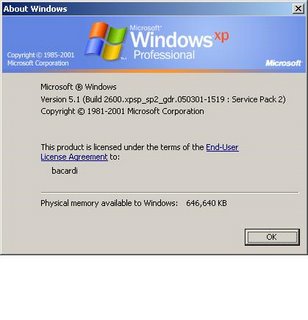 If it doesn't say XP PRO then it ain't pro . . .
It said media Center Edition. This was a big clue of course staring me right in the face. A little more research revealed that this version of XP, like the home edition, can't be joined into a domain. I hit some forums and there seemed to be some rumor that the only way it can be done is during installation. The customer didn't get the CD either with this new PC so they are going to order a new CD and use the old computer until then.
Media Center Edition of XP can't join a domain. This was a big surprise for me today. I though there were two flavors of XP and they were home and pro. Well there;s another version that floating around. I still don't know what makes this one special except for the name and the reason it would be opurchased instead of pro or home. I never had to install this version or even run the last setup steps on a new desktop. Today I had a customer that had just bought a new Dell system and needed the cnew desktop joined to the domain and the user's "stuff" moved over from their old system to the new. The old system is a story too. It turns out that they thought the computer just wasn't working anymore and that's how the computer problem had been expressed to my service department.
I go to the customer's office to check o nthe computer to see if there was enough life in it to get the data I needed off. The computer booted up just fine but when the user tried to log in, the hourglass just stayed on the screen literally forever. The system was looking for a Novell server to authenticate the user against. The Novell server had been removed and the user had not rebooted since then so they didn't come across this problem earlier. I dumped the novell client and the computer was logging in just fine. They were surprised to hear this but the user wasn't giving up the new desktop so easy and still wanted the new one.
So there I went. I un-boxed and hooked it up to the network a bright new keyboard and mouse and powered it up. I started clicking through the setup screens and rebooted. I started to then clean up programs using add/remove through the control panel removing things I now were just useless on this desktop computer for this customer. The time came to join the domain. Surprise. The join domain option in computer properties was greyed out. The system was coming up as XP pro. I checked the numbers and sure enough it was coming up as XP. But it wasn't. No where on the system itself did it say XP pro.
 If it doesn't say XP PRO then it ain't pro . . .
 It said media Center Edition. This was a big clue of course staring me right in the face. A little more research revealed that this version of XP, like the home edition, can't be joined into a domain. I hit some forums and there seemed to be some rumor that the only way it can be done is during installation. The customer didn't get the CD either with this new PC so they are going to order a new CD and use the old computer until then.
Sunday, June 25, 2006
Adtran Netvanta 3200
The Netvanta router from Adtran are accessable remotely using either a telnet session and through a web browser. They can be accessed quite easily on a local area network but for access from the internet, they need to have enabled acces from the wide area network optioned enabled.
In an earlier post I had a customer who had a point-to-point T1 connection between two offices. One of the offices in in NYC and the other is in the Bronx (unfortunately I had to go to the Bronx twice for this customer). They were doing VoIP between their two ofices with a couple of NEC Aspire phone systems. The problem was getting the quality of voice up to a nice level even though we had QoS enabled and configured correctly on both routers.
We checked their local area network for problems and the circuit itself - driving verizon people crazy (don't feel bad for them). I even tried different flavors of quality of service configurations and also enabled diffserv and packet tagging on the phone systems. Also monitored bandwidth usage. Nothing helped. No metter what we did, the voice was horrible whenever they started a download. Adtran couldn't helped with this problem. I like and admire Adtran's tech support as they are ver very good and often helped me get out of trouble. But this time they overlooked this solution.
Here is the solution. If you know of anyone, or it's you yourself reading this, with a couple of Netvanta 3200 routers trying to do quality of service and it just is not working our right then check that wieghted fair queuing (WFQ) is enabled on the router and not FIFO.
Once I enabled this option the quality was great.
In an earlier post I had a customer who had a point-to-point T1 connection between two offices. One of the offices in in NYC and the other is in the Bronx (unfortunately I had to go to the Bronx twice for this customer). They were doing VoIP between their two ofices with a couple of NEC Aspire phone systems. The problem was getting the quality of voice up to a nice level even though we had QoS enabled and configured correctly on both routers.
We checked their local area network for problems and the circuit itself - driving verizon people crazy (don't feel bad for them). I even tried different flavors of quality of service configurations and also enabled diffserv and packet tagging on the phone systems. Also monitored bandwidth usage. Nothing helped. No metter what we did, the voice was horrible whenever they started a download. Adtran couldn't helped with this problem. I like and admire Adtran's tech support as they are ver very good and often helped me get out of trouble. But this time they overlooked this solution.
Here is the solution. If you know of anyone, or it's you yourself reading this, with a couple of Netvanta 3200 routers trying to do quality of service and it just is not working our right then check that wieghted fair queuing (WFQ) is enabled on the router and not FIFO.
Once I enabled this option the quality was great.
Wednesday, June 21, 2006
Data wall jacks not working?
I went to a customer's office today on a call about a wireless problem. Once I got there of course other issues they were having came were remembered. One such problem was regarding two wall network wall jack that were "not working". I figured this would be an easy problem to fix, I started it before the more mysterious and dangerous wireless access point problem.
I checked both of the wall jacks with my laptop and they weren't working like they said. Not even a link light - forget about not getting an IP address. I toned them out to see if they even ran to their data room and they both did. But, of course, there was not patch cord going from the patch panel were the wires terminated to the data switch. I plugged two cables in and tested again. Both ports now linked u pthe the LAN fine. The customer paid for this. I guess to me and other in the support world this was a no brainer. I really think that if the customer had applied some simple troubleshooting skills and basic knowledge they could have avoided the bill. Oh and by the way, they wanted to start arguing that my company did the cabling and therefore they should not get billed. Go figure.
Now about the wireless problem. This has a few more twists in the plot than the wall jack problem did.
I checked both of the wall jacks with my laptop and they weren't working like they said. Not even a link light - forget about not getting an IP address. I toned them out to see if they even ran to their data room and they both did. But, of course, there was not patch cord going from the patch panel were the wires terminated to the data switch. I plugged two cables in and tested again. Both ports now linked u pthe the LAN fine. The customer paid for this. I guess to me and other in the support world this was a no brainer. I really think that if the customer had applied some simple troubleshooting skills and basic knowledge they could have avoided the bill. Oh and by the way, they wanted to start arguing that my company did the cabling and therefore they should not get billed. Go figure.
Now about the wireless problem. This has a few more twists in the plot than the wall jack problem did.
Subscribe to:
Posts (Atom)